Install the extension Universal Price Checker
Make sure that the service icon appears in the Google Chrome toolbar (upper right corner).
Tracking Setup
Open the site of interest, Move your mouse over the price you are interested in ,
Press the right key, Select the menu item PriceChecker => Follow
The number of sites/prices for which the service can follow is unlimited.
Price Checker Popup Info-Bar (available by clicking on the service icon in Chrome toolbar)
Make sure that the service icon appears in the Google Chrome toolbar (upper right corner).
Tracking Setup
Open the site of interest, Move your mouse over the price you are interested in ,
Press the right key, Select the menu item PriceChecker => Follow
The number of sites/prices for which the service can follow is unlimited.
Price Checker Popup Info-Bar (available by clicking on the service icon in Chrome toolbar)
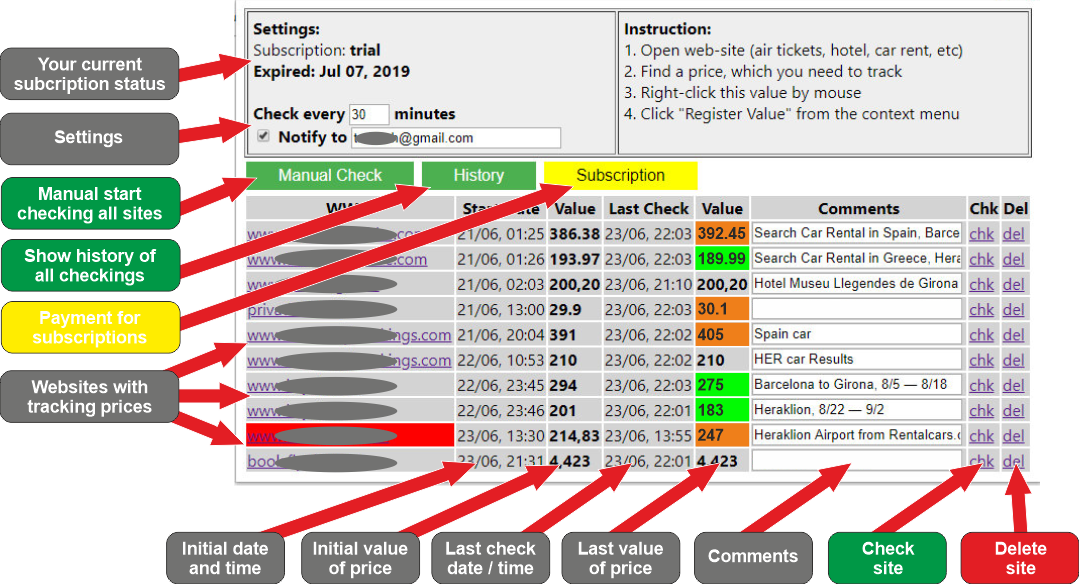
WWW - all sites with monitored prices. You can click on any site for open it with all the parameters made earlier and check the actual prices.
Red background on a site's url means fault of last checking this site.
Start Date, Value - primary date and Value of tracked price
Last Check, Value - the most recent verification date and price value at this time.
Green value background means that the price has become less than the primary value, orange, that the price has become more.
Comments - contains the name of the site. You are free to use this field.
Chk - start checking of current site.
Del - allows you to remove the site from the service.
Red background on a site's url means fault of last checking this site.
Start Date, Value - primary date and Value of tracked price
Last Check, Value - the most recent verification date and price value at this time.
Green value background means that the price has become less than the primary value, orange, that the price has become more.
Comments - contains the name of the site. You are free to use this field.
Chk - start checking of current site.
Del - allows you to remove the site from the service.
INSTRUCTION
PRICE CHECKER
Every 60 minutes (configurable), the service automatically opens on your computer an additional Google Chrome window in the background (you may notice a brief flicker on the screen at this instant).
Further, in the background, without in any way preventing you from continuing to use the computer, the service opens the customized sites and checks whether the prices that you set up for tracking have changed.
In case of a price change, the service opens its info-bat in the main window of Google Chrome plus sends a notification about the price change to your email (configurable). If for any reason the service could not check any site, it is highlighted with a red background in the info-panel.
Price changes are highlighted with a green/orange background when decreasing / increasing.
Further, in the background, without in any way preventing you from continuing to use the computer, the service opens the customized sites and checks whether the prices that you set up for tracking have changed.
In case of a price change, the service opens its info-bat in the main window of Google Chrome plus sends a notification about the price change to your email (configurable). If for any reason the service could not check any site, it is highlighted with a red background in the info-panel.
Price changes are highlighted with a green/orange background when decreasing / increasing.
HOW IT WORKS
SETTINGS
Refresh Rate - how often the system will start checking sites (in minutes)
Notify Option - enable (by default) or disable email notifications when prices change
Notify Option - enable (by default) or disable email notifications when prices change
SUBSCRIPTION
After installation you will have a 14-days trial period.
After trial expired you have to pay to use Price Checker service.
For pay you have to click "Subscription" button in extension Info-Bar.
For open extension Info-Bar click to extension icon in Google Chrome toolbar.
After trial expired you have to pay to use Price Checker service.
For pay you have to click "Subscription" button in extension Info-Bar.
For open extension Info-Bar click to extension icon in Google Chrome toolbar.
Copyright © 2019 by Vadym Gorenbukh
E-Mail: info@ownerhelper.com
Terms
E-Mail: info@ownerhelper.com
Terms
Regularly checks changing prices, allowing you to save hundreds on hotel, car, airline ticket bookings, and more.
The service works locally on your computer in the environment of your Google Chrome - complete privacy of information.
When prices change on sites that have been configured in the service, you will receive a notification on the screen and a message to your email (customizable)
The service works locally on your computer in the environment of your Google Chrome - complete privacy of information.
When prices change on sites that have been configured in the service, you will receive a notification on the screen and a message to your email (customizable)